

Click here for information about the native app.
Update: 5/20/26
- I’m still making adjustments to the new SDR software configuration. Overall, I’ve been pleased with how it performs. I did have to rethink the audio post-processing to get the levels right, and I’m still not completely settled on how I want to handle the actual decode/capture/commit to file process.
- I ran into an issue where audio was being delivered out of order post-capture following an update Monday evening, which continued into a complete fiber optic outage for about the first six hours of Tuesday morning. Both issues were resolved.
- The new configuration currently monitors, decodes, and records six P25 sites on the AWIN system, and has allowed me to add a number of new talkgroups to the system.
- I changed the default Incident Feed display (in the Alerts & Notifications menu) to filter out any detected incident or statistical anomaly notification that has been “resolved” by the system.
- Speaking of detected incidents and anomalies, I’ve been compiling detection data and will tighten up the detection logic soon. Some of the detected “incidents” make absolutely no sense whatsoever, mostly because I’m the one writing the code.
- Added a live, continuously updating status display for the AWIN system (in the main menu). I’m pretty happy with it, too.
- I still have to come up with a help section.
- The CAP+ system in St. Francis County is still driving me crazy.
- The Evening Times posted something about EAN on their Facebook page a couple of weeks ago, which I appreciate greatly. I’m not on social media but I could tell something was up because of a sudden increase in traffic to the site. That’s usually how people find out about EAN – word of mouth.
- I feel like this is a good place to point out that I don’t do this for money. I don’t have anything for sale. You can’t pay for any sort of upgraded access. I don’t advertise on this site.
- If you know someone who may find this site interesting or beneficial, please share it with them!
- Feel free to contact me (admin@eastarknet.com) if I can be of assistance.
Update: 5/9/26
- I moved the West Memphis AWIN site from my hardware radios to my SDR machine early this morning. This should mean virtually zero missed calls from West Memphis, Marion, and the rest of Crittenden County.
- I’m using different software for all the P25 sites now. If things sound different than what you’re used to hearing on AWIN, that’s why. I will, of course, have to do some fine-tuning but the new software is holding its own so far. We’ll see how it does when atmospheric conditions get weird.
- Tone-outs now have an audio clip posted with the notification in the incident notification feed.
- Added tone detection and an option for notifications for the smaller fire departments in Crittenden County. Go to “Alerts & Notifications” in the main menu, and then go to the “Notification Settings” tab to enable them.
- Made some minor aesthetic improvements.
- I’m still working with the incident detection and statistical anomaly notifications. If you have these notifications enabled, expect random weirdness.
- Help section will be in the works soon.
- Drop me a line (admin@eastarknet.com) if you have any questions or feedback.
Update: 4/30/26
- I’ve more or less gotten the initial version of the new statistical system in place. Select “Statistics” from the main menu. It’s fairly basic but as I build more of a dataset, it’ll become more comprehensive. I’ve added an option to alert you when traffic patterns for a given talkgroup exceed certain parameters. It basically asks, “is this amount of traffic normal for this talkgroup for this timeframe on this day of the week?” If not, it sends a notification.
- I’ve also been tinkering with automated incident detection. It uses the same dataset as the statistics, but only the most recent data snapshot to maintain a real-time overall “awareness” of how the current radio traffic patterns compare not only to themselves historically, but also to each other in the context of the overall current picture. I have a framework in place with the most basic version of the logic in place, and I’m currently expanding on that to make it smarter and less prone to false positives. Right now, when it flags something it has determined to be a possible incident, it sends a notification. You may also choose to receive these notifications.
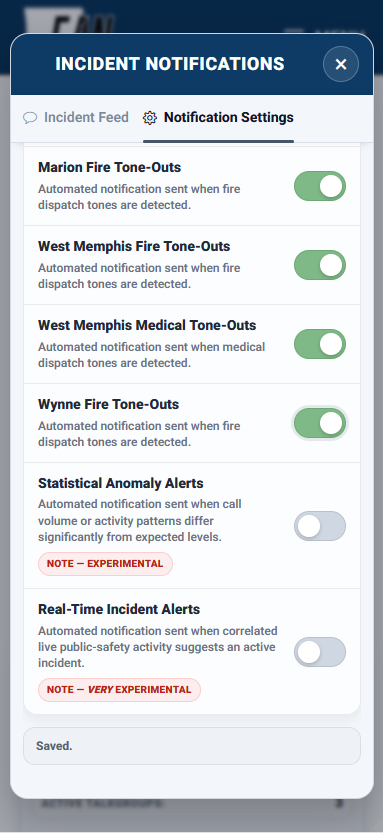
- The settings for receiving notifications to your device(s) are located under “Incident Notifications” in the main menu. Select the “Notification Settings” tab. If you scroll to the bottom, you’ll see the new options.
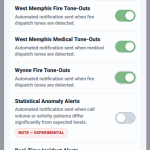 Please note that I will be making a considerable number of changes to the logic that drives the new notifications as I further develop and refine them and you may experience wild results, hence the “experimental” labels.
 - As always, if you know someone who might find this site useful, please share it with them.
- If you have any questions or comments, or if I can help you with an issue, email me at admin@eastarknet.com.
Update: 4/18/26
- The pursuit of the stolen Marion Police unit on Monday the 6th revealed that neither my server hardware nor my software configuration could handle a sudden, heavy demand. As a result, I have significantly upgraded the physical server and implemented new software packages and configurations. These changes should result in faster load times, decreased latency, and an overall improved experience; and the server should never become overwhelmed and grind to a halt again. If you encounter any issues or errors, please email me (admin@eastarknet.com).
- I did some work on my little weather widget to make it a little less ugly. The data it displays comes from my on-site weather station.
- I was in the process of doing a complete redesign of the statistics reporting system when I stopped to deal with the server upgrades. Now that the upgrades are complete, I can get back to work on the statistics. I do a lot of my work-in-progress development/testing on this page, if you want a preview.
- There are a few more cosmetic and performance tweaks to make.
- I still have actual “radio stuff” to do, I just want to get the server/website completed. I’ve got to figure out a way to get the West Memphis AWIN site over to my SDR machine. Every agency in Crittenden County is being handled by two hardware radios right now. They are fantastic radios (SDS200, if you’re interested) and are doing a stellar job with the not-always-ideal signal I’m getting on my Yagi antenna from about 35 miles away. Nevertheless, they are only capable of decoding one talkgroup at a time and that means missed calls when the system gets busy. I also have the issue of the signal from one of the St. Francis County CAP+ system’s three transmitters being significantly weaker than the other two. This has been driving me crazy since February.
Update: 3/31/26
- Severe weather season is here. If you think someone would benefit from the information available here, please let them know. I’m not on social media. It’s too social for my tastes. Google searches and word of mouth are the two ways people find out about EAN.
- I’ve made some cosmetic changes to the site in an attempt to make it look more uniform and (hopefully) easier to navigate. I’ll eventually unify everything so it looks and acts like it all belongs together. I’m a “function over form” kind of guy but I do understand how important aesthetics are to the overall user experience. I’m still working on it, just like everything else around here.
- The live activity map is new. It was my first foray into incorporating GeoJSON into a coding project and I’m pretty happy with it. It’s essentially an extension of the Live Talkgroup Activity grid display that shows a “where” with the “who.”
- I moved the 10-Codes into a modal window that opens on top of everything else, instead of taking you to a completely different page.
- I reworked the entire incident/fire tone-out notification system. It’s all in a modal window now, as well. The incident feed is back, after a long hiatus. Controls for push notifications have been moved to a tab in the Incident Notifications menu. Notifications are delivered quicker now. Tapping a push notification on your device now does something useful, instead of just taking you to the site.
- If you see/experience anything weird with the site or have any questions, please email me (admin@eastarknet.com).
- I haven’t done much in the way of actual “radio stuff” lately because I’ve spent so much time working on the website. I did a limited amount of testing with a different SDR setup and was able to get it configured enough to confirm it does work, but I have done zero testing and haven’t used in an actual “live” setting. I still need to figure out the St. Francis County CAP+ site once and for all. I also need to see if I can do better with the DMR systems in Wynne. I’m pretty sure I’m overloading the front end on both of these and need to add some attenuation.
Update: 3/13/26
- Someone emailed me with a question about connecting to my server with the Rdio Scanner mobile app. I added a screenshot to the section at the bottom of the page that might help. For listening on any device other than a computer, the app is the way to go.
- The Live Talkgroup Activity grid display (on the main page of the site) is project that started out as an idea for a basic visual indicator of traffic across all the systems I monitor. After about a week of working on it a few hours a day, it turned into what you see now. I’m pretty happy with it. I absolutely did not design it with mobile devices in mind as the primary display. It works on phones but I designed it to run in a desktop browser. It is meant for dispatch/communications centers, emergency operations centers, and radio/data nerds (like me). It’s all custom JS/PHP/CSS code. The information is generated from data that already exists in my database. Things like the Talkgroup Traffic Spike indication are dependent on logic that is somewhat rudimentary (because I developed it) and will be refined over time. This, like most of my projects, will never really be “complete.”
- I added a few things to the listener map.
- The issues with the St. Francis County CAP+ system persist and continue to affect FCPD, FCFD, and EMSA. Anything on 155.175 is hit or miss. The other two frequencies that make up this system are fine. This is the Frankenstein’s Monster of radio systems. The difference on the waterfall display on my SDR machine for 155.175 versus 158.7975 is night and day. No amount of signal processing is going to be able to fix it, this is purely an RF issue at this point. I’ll try to do some testing soon to see what, if anything, I need to do to improve the RF situation. Probably something that relates to messing with an antenna/coax, which is one of my least favorite activities.
- I now do some audio processing that helps maintain more consistent audio by raising low levels and lowering high levels across all systems.
- I’m considering a different architecture for the way I’m handling everything on the SDR machine, which would mean new software and a new configuration (and the headaches and growing pains that come with a new way of doing things), but may also mean an overall better system that’s less prone to weirdness and will scale easier.
- I’m not on social media (every platform is a dumpster fire). If you find this website useful, tell someone else about it!
- Drop me a line at admin@eastarknet.com if there’s anything I can do for you.
ABOUT THE NATIVE APP
There’s an app for Android and an app for iOS (that I did not create, do not maintain, and do not profit from) which will allow you to connect directly to my server. The app can do some stuff the web-based client can’t. It plays nicely with your media players and controllers. The app has ads. You don’t like ads, I don’t like ads. Nevertheless, they are there. They don’t have any effect on how the app does its job, they just exist. You can pay to remove them or not, or you can use the web-based client.
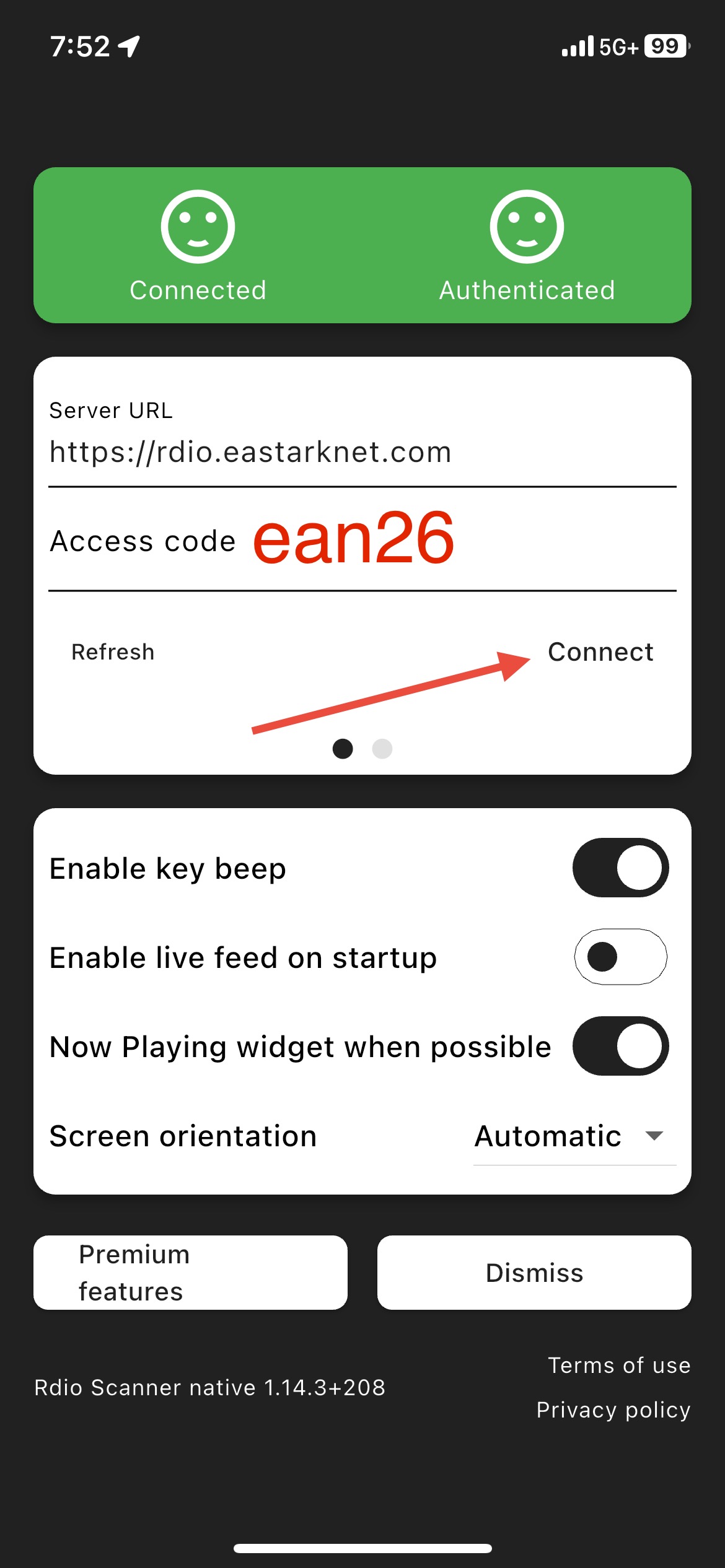
If you use the native app, the Server URL is:
https://rdio.eastarknet.com
Note the absence of an “a” in “rdio.” That’s intentional.
The Access Code is still “ean26” for guests.
EAN Chat
Incident Notifications
Filter alerts
Police Incident Alert
Automated
Today 12:24
Multi-agency activity detected - Crittenden County Sheriff / West Memphis Police Tactical 2.
This automated notification was cleared because the conditions that triggered it were no longer present as of Today 12:34.
Medical Tone-Out
Automated
Today 12:01
West Memphis Fire is being toned out. (Medical)
0:00
/
0:00
Fire Tone-Out
Automated
Today 10:19
Forrest City Fire is being toned out.
0:00
/
0:00
Incident Alert
Automated
Today 08:45
Elevated radio traffic - West Memphis.
This automated notification was cleared because the conditions that triggered it were no longer present as of Today 08:55.
Incident Alert
Automated
Today 08:44
Multi-agency activity detected - West Memphis / Crittenden County Small PD.
This automated notification was cleared because the conditions that triggered it were no longer present as of Today 08:54.
Medical Tone-Out
Automated
Today 08:20
West Memphis Fire is being toned out. (Medical)
0:00
/
0:00
Incident Alert
Automated
Today 06:27
Elevated radio traffic - West Memphis.
This automated notification was cleared because the conditions that triggered it were no longer present as of Today 06:37.
Incident Alert
Automated
Today 06:10
Elevated radio traffic - West Memphis.
This automated notification was cleared because the conditions that triggered it were no longer present as of Today 06:20.
Incident Alert
Automated
Today 06:07
Multi-agency activity detected - West Memphis / Crittenden County Sheriff.
This automated notification was cleared because the conditions that triggered it were no longer present as of Today 06:17.
Medical Tone-Out
Automated
Today 06:05
West Memphis Fire is being toned out. (Medical)
0:00
/
0:00
Police Incident Alert
Verified
Today 05:30
West Memphis Police are responding to a report of a naked man near the fire station on College Boulevard.
Incident Alert
Automated
Today 03:56
WOODRUFF SO call volume is 185.0% above expected for this point on recent Fridays.
This automated notification was cleared because the conditions that triggered it were no longer present as of Today 06:00.
Incident Alert
Automated
Today 01:35
FCPD is handling 9.8% above expected share of total activity so far today.
This automated notification was cleared because the conditions that triggered it were no longer present as of Today 01:40.
Incident Alert
Automated
Today 01:35
Elevated radio traffic - Forrest City.
This automated notification was cleared because the conditions that triggered it were no longer present as of Today 01:45.
Incident Alert
Automated
Today 01:00
WMPD is handling 9.8% above expected share of total activity so far today.
This automated notification was cleared because the conditions that triggered it were no longer present as of Today 01:35.
Incident Alert
Automated
Today 00:45
CROSS SO call volume is 102.6% above expected for this point on recent Fridays.
This automated notification was cleared because the conditions that triggered it were no longer present as of Today 01:00.
Incident Alert
Automated
Today 00:40
FCPD call volume is 43.0% above expected for this point on recent Fridays.
This automated notification was cleared because the conditions that triggered it were no longer present as of Today 00:45.
Incident Alert
Automated
Today 00:38
Elevated radio traffic - West Memphis.
This automated notification was cleared because the conditions that triggered it were no longer present as of Today 00:48.
Incident Alert
Automated
Today 00:35
WMPD call volume is 50.4% above expected for this point on recent Fridays.
This automated notification was cleared because the conditions that triggered it were no longer present as of Today 00:40.
Incident Alert
Automated
Today 00:29
Multi-agency activity detected - Marion.
This automated notification was cleared because the conditions that triggered it were no longer present as of Today 00:39.
Fire Tone-Out
Automated
Today 00:27
Marion Fire is being toned out.
0:00
/
0:00
Incident Alert
Automated
Yesterday 23:59
Multi-agency activity detected - West Memphis.
This automated notification was cleared because the conditions that triggered it were no longer present as of Today 00:10.
Fire Tone-Out
Automated
Yesterday 23:59
West Memphis Fire is being toned out. (Fire)
0:00
/
0:00
Incident Alert
Automated
Yesterday 23:44
Elevated radio traffic - West Memphis.
This automated notification was cleared because the conditions that triggered it were no longer present as of Yesterday 23:54.
Medical Tone-Out
Automated
Yesterday 23:44
West Memphis Fire is being toned out. (Medical)
0:00
/
0:00
Medical Tone-Out
Automated
Yesterday 23:43
West Memphis Fire is being toned out. (Medical)
0:00
/
0:00
Medical Tone-Out
Automated
Yesterday 22:19
West Memphis Fire is being toned out. (Medical)
0:00
/
0:00
Medical Tone-Out
Automated
Yesterday 21:47
West Memphis Fire is being toned out. (Medical)
0:00
/
0:00
Incident Alert
Automated
Yesterday 20:49
Multi-agency activity detected - Crittenden County Sheriff / Marion Fire.
This automated notification was cleared because the conditions that triggered it were no longer present as of Yesterday 20:59.
Fire Tone-Out
Automated
Yesterday 20:48
Marion Fire is being toned out.
0:00
/
0:00
Incident Alert
Automated
Yesterday 19:33
Multi-agency activity detected - West Memphis / Marion Police.
This automated notification was cleared because the conditions that triggered it were no longer present as of Yesterday 19:43.
Incident Alert
Automated
Yesterday 19:31
Elevated radio traffic - West Memphis.
This automated notification was cleared because the conditions that triggered it were no longer present as of Yesterday 19:41.
Incident Alert
Automated
Yesterday 19:22
Multi-agency activity detected - Crittenden County Sheriff / West Memphis.
This automated notification was cleared because the conditions that triggered it were no longer present as of Yesterday 19:32.
Medical Tone-Out
Automated
Yesterday 18:49
West Memphis Fire is being toned out. (Medical)
0:00
/
0:00
Medical Tone-Out
Automated
Yesterday 18:15
West Memphis Fire is being toned out. (Medical)
0:00
/
0:00
Fire Tone-Out
Automated
Yesterday 17:32
West Memphis Fire is being toned out. (Fire)
0:00
/
0:00
Fire Tone-Out
Automated
Yesterday 17:02
Marion Fire is being toned out.
0:00
/
0:00
Police Incident Alert
Automated
Yesterday 16:54
Elevated radio traffic - West Memphis.
This automated notification was cleared because the conditions that triggered it were no longer present as of Yesterday 17:04.
Medical Tone-Out
Automated
Yesterday 16:53
West Memphis Fire is being toned out. (Medical)
0:00
/
0:00
Incident Alert
Automated
Yesterday 16:05
MAC 3 call volume is 20017.6% above expected for this point on recent Thursdays.
This automated notification was cleared because the conditions that triggered it were no longer present as of Yesterday 19:57.
Medical Tone-Out
Automated
Yesterday 15:08
West Memphis Fire is being toned out. (Medical)
0:00
/
0:00
Medical Tone-Out
Automated
Yesterday 14:48
West Memphis Fire is being toned out. (Medical)
0:00
/
0:00
Incident Alert
Automated
Yesterday 13:41
Multi-agency activity detected - West Memphis Police / Crittenden County Sheriff.
This automated notification was cleared because the conditions that triggered it were no longer present as of Yesterday 13:51.
Fire Tone-Out
Automated
Yesterday 13:39
West Memphis Fire is being toned out. (Fire)
0:00
/
0:00
Medical Tone-Out
Automated
Yesterday 12:07
West Memphis Fire is being toned out. (Medical)
0:00
/
0:00
Medical Tone-Out
Automated
Yesterday 11:20
West Memphis Fire is being toned out. (Medical)
0:00
/
0:00
Medical Tone-Out
Automated
Yesterday 11:19
West Memphis Fire is being toned out. (Medical)
0:00
/
0:00
Incident Alert
Automated
Yesterday 10:45
CRITT SO TRAF call volume is 291.7% above expected for this point on recent Thursdays.
This automated notification was cleared because the conditions that triggered it were no longer present as of Yesterday 11:46.
Police Incident Alert
Automated
Yesterday 09:07
Multi-agency activity detected - Crittenden.
This automated notification was cleared because the conditions that triggered it were no longer present as of Yesterday 09:17.
Incident Alert
Automated
Yesterday 09:02
Multi-agency activity detected - Crittenden County Small PD / Marion Police.
This automated notification was cleared because the conditions that triggered it were no longer present as of Yesterday 09:12.
Fire Tone-Out
Automated
Yesterday 09:01
Marion Fire is being toned out.
0:00
/
0:00
Incident Alert
Automated
Yesterday 07:10
LEE SO call volume is 98.4% above expected for this point on recent Thursdays.
This automated notification was cleared because the conditions that triggered it were no longer present as of Yesterday 07:12.
Medical Tone-Out
Automated
Yesterday 06:39
West Memphis Fire is being toned out. (Medical)
0:00
/
0:00
Medical Tone-Out
Automated
Yesterday 05:56
West Memphis Fire is being toned out. (Medical)
0:00
/
0:00
Incident Alert
Automated
Yesterday 04:57
ASP TROOP D call volume is 69.3% above expected for this point on recent Thursdays.
This automated notification was cleared because the conditions that triggered it were no longer present as of Yesterday 05:07.
Medical Tone-Out
Automated
Yesterday 04:16
West Memphis Fire is being toned out. (Medical)
0:00
/
0:00
Incident Alert
Automated
Yesterday 03:59
Elevated radio traffic - West Memphis.
This automated notification was cleared because the conditions that triggered it were no longer present as of Yesterday 04:09.
Incident Alert
Automated
Yesterday 03:40
Elevated radio traffic - West Memphis.
This automated notification was cleared because the conditions that triggered it were no longer present as of Yesterday 03:50.
Medical Tone-Out
Automated
Yesterday 03:37
West Memphis Fire is being toned out. (Medical)
0:00
/
0:00
Incident Alert
Automated
Yesterday 03:21
Multi-agency activity detected - West Memphis Police / Crittenden County Sheriff.
This automated notification was cleared because the conditions that triggered it were no longer present as of Yesterday 03:36.
Fire Tone-Out
Automated
Yesterday 03:19
West Memphis Fire is being toned out. (Fire)
0:00
/
0:00
Fire Tone-Out
Automated
Yesterday 02:00
Marion Fire is being toned out.
0:00
/
0:00
Medical Tone-Out
Automated
Yesterday 00:21
West Memphis Fire is being toned out. (Medical)
0:00
/
0:00
Incident Alert
Automated
Yesterday 00:15
WMPD is handling 12.5% above expected share of total activity so far today.
This automated notification was cleared because the conditions that triggered it were no longer present as of Yesterday 04:48.
Police Incident Alert
Automated
06-10-2026 23:08
Multi-agency activity detected - West Memphis Police Tactical 1 / Crittenden County Sheriff.
This automated notification was cleared because the conditions that triggered it were no longer present as of 06-10-2026 23:18.
Police Incident Alert
Automated
06-10-2026 22:55
Multi-agency activity detected - West Memphis Police Tactical 1 / Crittenden County Sheriff.
This automated notification was cleared because the conditions that triggered it were no longer present as of 06-10-2026 23:05.
Medical Tone-Out
Automated
06-10-2026 22:25
West Memphis Fire is being toned out. (Medical)
0:00
/
0:00
Medical Tone-Out
Automated
06-10-2026 22:22
West Memphis Fire is being toned out. (Medical)
0:00
/
0:00
Fire Tone-Out
Automated
06-10-2026 22:18
West Memphis Fire is being toned out. (Fire)
0:00
/
0:00
Fire Tone-Out
Automated
06-10-2026 22:14
West Memphis Fire is being toned out. (Fire)
0:00
/
0:00
Medical Tone-Out
Automated
06-10-2026 21:25
West Memphis Fire is being toned out. (Medical)
0:00
/
0:00
Police Incident Alert
Automated
06-10-2026 20:43
Multi-agency activity detected - Crittenden County Sheriff / West Memphis Police Tactical 1.
This automated notification was cleared because the conditions that triggered it were no longer present as of 06-10-2026 20:53.
Police Incident Alert
Automated
06-10-2026 20:39
Multi-agency activity detected - Marion Police / West Memphis Police Tactical 1.
This automated notification was cleared because the conditions that triggered it were no longer present as of 06-10-2026 20:49.
Medical Tone-Out
Automated
06-10-2026 20:33
West Memphis Fire is being toned out. (Medical)
0:00
/
0:00
Medical Tone-Out
Automated
06-10-2026 20:08
West Memphis Fire is being toned out. (Medical)
0:00
/
0:00
Medical Tone-Out
Automated
06-10-2026 19:04
West Memphis Fire is being toned out. (Medical)
0:00
/
0:00
Incident Alert
Automated
06-10-2026 17:11
Elevated radio traffic - West Memphis.
This automated notification was cleared because the conditions that triggered it were no longer present as of 06-10-2026 17:21.
Medical Tone-Out
Automated
06-10-2026 17:10
West Memphis Fire is being toned out. (Medical)
0:00
/
0:00
Incident Alert
Automated
06-10-2026 16:49
Multi-agency activity detected - West Memphis.
This automated notification was cleared because the conditions that triggered it were no longer present as of 06-10-2026 16:59.
Fire Tone-Out
Automated
06-10-2026 16:48
West Memphis Fire is being toned out. (Fire)
0:00
/
0:00
Medical Tone-Out
Automated
06-10-2026 16:47
West Memphis Fire is being toned out. (Medical)
0:00
/
0:00
Fire Tone-Out
Automated
06-10-2026 16:11
Crittenden County Fire is being toned out.
0:00
/
0:00
Fire Tone-Out
Automated
06-10-2026 16:00
West Memphis Fire is being toned out. (Fire)
0:00
/
0:00
Fire Tone-Out
Automated
06-10-2026 15:51
West Memphis Fire is being toned out. (Fire)
0:00
/
0:00
Fire Tone-Out
Automated
06-10-2026 15:18
Wynne Fire is being toned out.
0:00
/
0:00
Incident Alert
Automated
06-10-2026 15:07
Active incident likely - West Memphis / Crittenden County Sheriff.
This automated notification was cleared because the conditions that triggered it were no longer present as of 06-10-2026 15:17.
Incident Alert
Automated
06-10-2026 15:04
Active incident likely - Marion Police / West Memphis area.
This automated notification was cleared because the conditions that triggered it were no longer present as of 06-10-2026 15:14.
Incident Alert
Automated
06-10-2026 14:57
Active incident likely - West Memphis.
This automated notification was cleared because the conditions that triggered it were no longer present as of 06-10-2026 15:07.
Fire Tone-Out
Verified
06-10-2026 14:54
West Memphis Fire is being toned out. (Residential Fire Alarm)
0:00
/
0:00
Medical Tone-Out
Automated
06-10-2026 14:30
West Memphis Fire is being toned out. (Medical)
0:00
/
0:00
Incident Alert
Automated
06-10-2026 14:12
Active incident likely - West Memphis / Crittenden County Sheriff Traffic.
This automated notification was cleared because the conditions that triggered it were no longer present as of 06-10-2026 14:22.
Incident Alert
Automated
06-10-2026 14:11
Multi-agency activity detected - West Memphis / Marion Fire.
This automated notification was cleared because the conditions that triggered it were no longer present as of 06-10-2026 14:21.
Medical Tone-Out
Automated
06-10-2026 14:08
West Memphis Fire is being toned out. (Medical)
0:00
/
0:00
Fire Tone-Out
Automated
06-10-2026 14:00
Marion Fire is being toned out.
0:00
/
0:00
Medical Tone-Out
Automated
06-10-2026 14:00
West Memphis Fire is being toned out. (Medical)
0:00
/
0:00
Incident Alert
Automated
06-10-2026 13:59
Elevated radio traffic - West Memphis.
This automated notification was cleared because the conditions that triggered it were no longer present as of 06-10-2026 14:09.
Medical Tone-Out
Automated
06-10-2026 13:15
West Memphis Fire is being toned out. (Medical)
0:00
/
0:00
Incident Alert
Automated
06-10-2026 12:11
Elevated radio traffic - Forrest City.
This automated notification was cleared because the conditions that triggered it were no longer present as of 06-10-2026 12:21.
Incident Alert
Automated
06-10-2026 10:30
CRITT SO TRAF call volume is 650.0% above expected for this point on recent Wednesdays.
This automated notification was cleared because the conditions that triggered it were no longer present as of 06-10-2026 11:22.
Incident Alert
Automated
06-10-2026 10:03
Multi-agency activity detected - Crittenden County Sheriff / Marion Police area.
This automated notification was cleared because the conditions that triggered it were no longer present as of 06-10-2026 10:13.
Incident Alert
Automated
06-10-2026 09:35
WMFD call volume is 80.9% above expected for this point on recent Wednesdays.
This automated notification was cleared because the conditions that triggered it were no longer present as of 06-10-2026 10:05.
Fire Incident Alert
Verified
06-10-2026 09:22
West Memphis Fire is responding to a possible grease fire at the McDonald's on Petro Road.
9:25 - Training 1 arrived on scene and advised Battalion the fire was out, there was no significant smoke in the building, and that there were two or three employees with smoke inhalation. Battalion advised all except one engine company and one EMS unit to disregard.
9:25 - Training 1 arrived on scene and advised Battalion the fire was out, there was no significant smoke in the building, and that there were two or three employees with smoke inhalation. Battalion advised all except one engine company and one EMS unit to disregard.
Fire Tone-Out
Automated
06-10-2026 09:21
West Memphis Fire is being toned out. (Fire)
0:00
/
0:00
Incident Alert
Automated
06-10-2026 09:00
WMPD is handling 9.2% above expected share of total activity so far today.
This automated notification was cleared because the conditions that triggered it were no longer present as of 06-10-2026 09:10.
Fire Incident Alert
Automated
06-10-2026 09:00
Elevated radio traffic - West Memphis.
This automated notification was cleared because the conditions that triggered it were no longer present as of 06-10-2026 09:10.
Medical Tone-Out
Automated
06-10-2026 08:53
West Memphis Fire is being toned out. (Medical)
0:00
/
0:00
Incident Alert
Automated
06-10-2026 08:35
ASP TROOP B call volume is 75.2% above expected for this point on recent Wednesdays.
This automated notification was cleared because the conditions that triggered it were no longer present as of 06-10-2026 09:00.
Incident Alert
Automated
06-10-2026 08:10
ST FRANCIS SO call volume is 77.1% above expected for this point on recent Wednesdays.
This automated notification was cleared because the conditions that triggered it were no longer present as of 06-10-2026 08:20.
Incident Alert
Automated
06-10-2026 08:02
Multi-agency activity detected - West Memphis / Marion Police.
This automated notification was cleared because the conditions that triggered it were no longer present as of 06-10-2026 08:12.
Incident Alert
Automated
06-10-2026 07:57
Elevated radio traffic - West Memphis.
This automated notification was cleared because the conditions that triggered it were no longer present as of 06-10-2026 08:07.
Incident Alert
Automated
06-10-2026 05:56
Elevated radio traffic - West Memphis.
This automated notification was cleared because the conditions that triggered it were no longer present as of 06-10-2026 06:06.
Medical Tone-Out
Automated
06-10-2026 05:55
West Memphis Fire is being toned out. (Medical)
0:00
/
0:00
Incident Alert
Automated
06-10-2026 05:09
CLEBURNE SO call volume is 129.8% above expected for this point on recent Wednesdays.
This automated notification was cleared because the conditions that triggered it were no longer present as of 06-10-2026 07:02.
Medical Tone-Out
Automated
06-10-2026 05:03
West Memphis Fire is being toned out. (Medical)
0:00
/
0:00
Incident Alert
Automated
06-10-2026 04:59
Multi-agency activity detected - Crittenden County Sheriff / West Memphis Fire.
This automated notification was cleared because the conditions that triggered it were no longer present as of 06-10-2026 05:09.
Incident Alert
Automated
06-10-2026 04:51
Multi-agency activity detected - West Memphis.
This automated notification was cleared because the conditions that triggered it were no longer present as of 06-10-2026 05:01.
Fire Tone-Out
Automated
06-10-2026 04:48
West Memphis Fire is being toned out. (Fire)
0:00
/
0:00
Incident Alert
Automated
06-10-2026 04:37
Multi-agency activity detected - West Memphis.
This automated notification was cleared because the conditions that triggered it were no longer present as of 06-10-2026 04:49.
Fire Incident Alert
Verified
06-10-2026 04:36
West Memphis Fire and Police are en route to a vehicle fire at 3221 Infinity Parkway.
Fire Tone-Out
Automated
06-10-2026 04:34
West Memphis Fire is being toned out. (Fire)
0:00
/
0:00
Fire Tone-Out
Automated
06-10-2026 04:01
Marion Fire is being toned out.
0:00
/
0:00
Fire Tone-Out
Automated
06-10-2026 03:28
Forrest City Fire is being toned out.
0:00
/
0:00
Incident Alert
Automated
06-10-2026 01:40
CROSS SO call volume is 116.2% above expected for this point on recent Wednesdays.
This automated notification was cleared because the conditions that triggered it were no longer present as of 06-10-2026 02:05.
Incident Alert
Automated
06-10-2026 01:31
Multi-agency activity detected - West Memphis / Crittenden County Sheriff.
This automated notification was cleared because the conditions that triggered it were no longer present as of 06-10-2026 01:41.
Incident Alert
Automated
06-10-2026 01:10
CROSS SO is handling 11.8% above expected share of total activity so far today.
This automated notification was cleared because the conditions that triggered it were no longer present as of 06-10-2026 01:40.
Incident Alert
Automated
06-10-2026 01:05
WMPD call volume is 46.3% above expected for this point on recent Wednesdays.
This automated notification was cleared because the conditions that triggered it were no longer present as of 06-10-2026 01:10.
Fire Tone-Out
Automated
06-10-2026 00:43
Marion Fire is being toned out.
0:00
/
0:00
Incident Alert
Automated
06-10-2026 00:15
FCPD is handling 8.9% above expected share of total activity so far today.
This automated notification was cleared because the conditions that triggered it were no longer present as of 06-10-2026 01:04.
Fire Tone-Out
Automated
06-09-2026 23:30
Marion Fire is being toned out.
0:00
/
0:00
Fire Tone-Out
Automated
06-09-2026 21:59
Forrest City Fire is being toned out.
0:00
/
0:00
Medical Tone-Out
Automated
06-09-2026 21:57
West Memphis Fire is being toned out. (Medical)
0:00
/
0:00
Fire Tone-Out
Automated
06-09-2026 21:19
Wynne Fire is being toned out.
0:00
/
0:00
Medical Tone-Out
Automated
06-09-2026 20:45
West Memphis Fire is being toned out. (Medical)
0:00
/
0:00
Incident Alert
Automated
06-09-2026 20:15
Multi-agency activity detected - West Memphis.
This automated notification was cleared because the conditions that triggered it were no longer present as of 06-09-2026 20:25.
Medical Tone-Out
Automated
06-09-2026 20:05
West Memphis Fire is being toned out. (Medical)
0:00
/
0:00
Incident Alert
Automated
06-09-2026 18:52
Multi-agency activity detected - Marion Police / Crittenden County Sheriff area.
This automated notification was cleared because the conditions that triggered it were no longer present as of 06-09-2026 19:02.
Medical Tone-Out
Automated
06-09-2026 18:52
West Memphis Fire is being toned out. (Medical)
0:00
/
0:00
Medical Tone-Out
Automated
06-09-2026 18:50
West Memphis Fire is being toned out. (Medical)
0:00
/
0:00
Incident Alert
Automated
06-09-2026 17:06
Elevated radio traffic - West Memphis.
This automated notification was cleared because the conditions that triggered it were no longer present as of 06-09-2026 17:16.
Medical Tone-Out
Automated
06-09-2026 17:06
West Memphis Fire is being toned out. (Medical)
0:00
/
0:00
Medical Tone-Out
Automated
06-09-2026 16:57
West Memphis Fire is being toned out. (Medical)
0:00
/
0:00
Medical Tone-Out
Automated
06-09-2026 16:57
West Memphis Fire is being toned out. (Medical)
0:00
/
0:00
Medical Tone-Out
Automated
06-09-2026 16:08
West Memphis Fire is being toned out. (Medical)
0:00
/
0:00
Incident Alert
Automated
06-09-2026 16:05
CRITT SO TRAF call volume is 354.5% above expected for this point on recent Tuesdays.
This automated notification was cleared because the conditions that triggered it were no longer present as of 06-09-2026 16:34.
Medical Tone-Out
Automated
06-09-2026 15:53
West Memphis Fire is being toned out. (Medical)
0:00
/
0:00
Medical Tone-Out
Automated
06-09-2026 15:51
West Memphis Fire is being toned out. (Medical)
0:00
/
0:00
Fire Tone-Out
Automated
06-09-2026 15:47
Marion Fire is being toned out.
0:00
/
0:00
Medical Tone-Out
Automated
06-09-2026 15:38
West Memphis Fire is being toned out. (Medical)
0:00
/
0:00
Fire Tone-Out
Automated
06-09-2026 15:20
Wynne Fire is being toned out.
0:00
/
0:00
Fire Tone-Out
Automated
06-09-2026 14:48
Wynne Fire is being toned out.
0:00
/
0:00
Incident Alert
Automated
06-09-2026 14:00
MARION PD call volume is 79.5% above expected for this point on recent Tuesdays.
This automated notification was cleared because the conditions that triggered it were no longer present as of 06-09-2026 14:05.
Incident Alert
Automated
06-09-2026 13:15
ASP TROOP D call volume is 73.6% above expected for this point on recent Tuesdays.
This automated notification was cleared because the conditions that triggered it were no longer present as of 06-09-2026 14:00.
Medical Tone-Out
Automated
06-09-2026 12:45
West Memphis Fire is being toned out. (Medical)
0:00
/
0:00
Incident Alert
Automated
06-09-2026 12:45
AHP D2 call volume is 76.4% above expected for this point on recent Tuesdays.
This automated notification was cleared because the conditions that triggered it were no longer present as of 06-09-2026 13:15.
Incident Alert
Automated
06-09-2026 12:32
Multi-agency activity detected - Marion Police / Crittenden County Small PD area.
This automated notification was cleared because the conditions that triggered it were no longer present as of 06-09-2026 12:42.
ASP Net Direct
Automated
06-09-2026 12:05
Arkansas State Police Troop D is net direct.
0:00
/
0:00
ASP Net Direct
Automated
06-09-2026 12:00
Arkansas State Police Troop D is net direct.
0:00
/
0:00
Medical Tone-Out
Automated
06-09-2026 11:55
West Memphis Fire is being toned out. (Medical)
0:00
/
0:00
Medical Tone-Out
Automated
06-09-2026 09:19
West Memphis Fire is being toned out. (Medical)
0:00
/
0:00
Incident Alert
Automated
06-09-2026 09:00
PHILLIPS SO call volume is 117.6% above expected for this point on recent Tuesdays.
This automated notification was cleared because the conditions that triggered it were no longer present as of 06-09-2026 09:05.
Fire Tone-Out
Automated
06-09-2026 08:56
Marion Fire is being toned out.
0:00
/
0:00
Fire Tone-Out
Automated
06-09-2026 08:38
Wynne Fire is being toned out.
0:00
/
0:00
Incident Alert
Automated
06-09-2026 07:33
Elevated radio traffic - West Memphis.
This automated notification was cleared because the conditions that triggered it were no longer present as of 06-09-2026 07:43.
Medical Tone-Out
Automated
06-09-2026 07:26
West Memphis Fire is being toned out. (Medical)
0:00
/
0:00
Incident Alert
Automated
06-09-2026 07:21
Elevated radio traffic - West Memphis.
This automated notification was cleared because the conditions that triggered it were no longer present as of 06-09-2026 07:31.
Incident Alert
Automated
06-09-2026 07:17
Elevated radio traffic - Crittenden.
This automated notification was cleared because the conditions that triggered it were no longer present as of 06-09-2026 07:27.
Fire Tone-Out
Automated
06-09-2026 06:53
Crittenden County Fire is being toned out.
0:00
/
0:00
Fire Tone-Out
Automated
06-09-2026 06:52
Crittenden County Fire is being toned out.
0:00
/
0:00
Incident Alert
Automated
06-09-2026 06:27
Elevated radio traffic - West Memphis.
This automated notification was cleared because the conditions that triggered it were no longer present as of 06-09-2026 06:37.
Incident Alert
Automated
06-09-2026 06:03
Multi-agency activity detected - West Memphis / Marion Police.
This automated notification was cleared because the conditions that triggered it were no longer present as of 06-09-2026 06:13.
Incident Alert
Automated
06-09-2026 06:02
Elevated radio traffic - West Memphis.
This automated notification was cleared because the conditions that triggered it were no longer present as of 06-09-2026 06:12.
Medical Tone-Out
Automated
06-09-2026 05:56
West Memphis Fire is being toned out. (Medical)
0:00
/
0:00
Medical Tone-Out
Automated
06-09-2026 05:49
West Memphis Fire is being toned out. (Medical)
0:00
/
0:00
Incident Alert
Automated
06-09-2026 05:21
Elevated radio traffic - West Memphis.
This automated notification was cleared because the conditions that triggered it were no longer present as of 06-09-2026 05:31.
Medical Tone-Out
Automated
06-09-2026 05:06
West Memphis Fire is being toned out. (Medical)
0:00
/
0:00
Incident Alert
Automated
06-09-2026 04:59
Elevated radio traffic - West Memphis.
This automated notification was cleared because the conditions that triggered it were no longer present as of 06-09-2026 05:19.
Medical Tone-Out
Automated
06-09-2026 04:57
West Memphis Fire is being toned out. (Medical)
0:00
/
0:00
Incident Alert
Automated
06-09-2026 04:22
Elevated radio traffic - West Memphis.
This automated notification was cleared because the conditions that triggered it were no longer present as of 06-09-2026 04:36.
Fire Tone-Out
Automated
06-09-2026 04:12
West Memphis Fire is being toned out. (Fire)
0:00
/
0:00
Incident Alert
Automated
06-09-2026 02:05
WMPD is handling 18.4% above expected share of total activity so far today.
This automated notification was cleared because the conditions that triggered it were no longer present as of 06-09-2026 06:54.
Incident Alert
Automated
06-09-2026 00:35
WMFD call volume is 216.2% above expected for this point on recent Tuesdays.
This automated notification was cleared because the conditions that triggered it were no longer present as of 06-09-2026 01:05.
Incident Alert
Automated
06-09-2026 00:30
WMFD is handling 14.4% above expected share of total activity so far today.
This automated notification was cleared because the conditions that triggered it were no longer present as of 06-09-2026 00:35.
Incident Alert
Automated
06-09-2026 00:25
WMPD call volume is 39.1% above expected for this point on recent Tuesdays.
This automated notification was cleared because the conditions that triggered it were no longer present as of 06-09-2026 00:30.
Medical Tone-Out
Automated
06-09-2026 00:17
West Memphis Fire is being toned out. (Medical)
0:00
/
0:00
Fire Tone-Out
Automated
06-09-2026 00:16
West Memphis Fire is being toned out. (Fire)
0:00
/
0:00
Fire Tone-Out
Automated
06-09-2026 00:16
West Memphis Fire is being toned out. (Fire)
0:00
/
0:00
Incident Alert
Automated
06-08-2026 23:40
Elevated radio traffic - West Memphis.
This automated notification was cleared because the conditions that triggered it were no longer present as of 06-08-2026 23:50.
Medical Tone-Out
Automated
06-08-2026 23:37
West Memphis Fire is being toned out. (Medical)
0:00
/
0:00
Medical Tone-Out
Automated
06-08-2026 23:18
West Memphis Fire is being toned out. (Medical)
0:00
/
0:00
Medical Tone-Out
Automated
06-08-2026 20:52
West Memphis Fire is being toned out. (Medical)
0:00
/
0:00
Incident Alert
Automated
06-08-2026 19:45
Elevated radio traffic - Marion.
This automated notification was cleared because the conditions that triggered it were no longer present as of 06-08-2026 19:55.
Medical Tone-Out
Automated
06-08-2026 19:24
West Memphis Fire is being toned out. (Medical)
0:00
/
0:00
Medical Tone-Out
Automated
06-08-2026 18:35
West Memphis Fire is being toned out. (Medical)
0:00
/
0:00
Medical Tone-Out
Automated
06-08-2026 18:27
West Memphis Fire is being toned out. (Medical)
0:00
/
0:00
Fire Tone-Out
Automated
06-08-2026 17:49
Wynne Fire is being toned out.
0:00
/
0:00
Fire Tone-Out
Automated
06-08-2026 17:30
Marion Fire is being toned out.
0:00
/
0:00
Incident Alert
Automated
06-08-2026 17:20
LEE SO call volume is 77.1% above expected for this point on recent Mondays.
This automated notification was cleared because the conditions that triggered it were no longer present as of 06-08-2026 17:24.
Medical Tone-Out
Automated
06-08-2026 17:14
West Memphis Fire is being toned out. (Medical)
0:00
/
0:00
Traffic Incident Alert
Verified
06-08-2026 16:23
Cross County deputies are on the scene at Hwy 64 and 49 in Fair Oaks, where a tractor-trailer has knocked the railroad crossing arms and post onto the railroad tracks.
Incident Alert
Automated
06-08-2026 16:05
ASP TROOP D call volume is 77.2% above expected for this point on recent Mondays.
This automated notification was cleared because the conditions that triggered it were no longer present as of 06-08-2026 17:20.
Enable Notifications
This must be enabled to receive notifications. Individual selections for the notifications you receive may be made below.
Incident Alerts
Notifications about specific incidents. These are NOT automated and are human-generated. Enabled by default.
State Police Net Direct
Automated notification sent when Arkansas State Police priority emergency traffic mode is detected.
Forrest City Fire Tone-Outs
Automated notification sent when fire dispatch tones are detected.
Marion Fire Tone-Outs
Automated notification sent when fire dispatch tones are detected.
Crittenden County Fire Tone-Outs
Includes Earle, Gilmore, Heafer, Horseshoe Lake, Jennette, and Turrell
Automated notification sent when fire dispatch tones are detected.
West Memphis Fire Tone-Outs (Fire)
Automated notification sent when fire dispatch tones are detected.
West Memphis Fire Tone-Outs (Medical)
Automated notification sent when medical dispatch tones are detected.
Wynne Fire Tone-Outs
Automated notification sent when fire dispatch tones are detected.
Statistical Anomaly Alerts
Automated notification sent when call volume or activity patterns differ significantly from expected levels.
Note — experimental
Real-Time Incident Alerts
Automated notification sent when correlated live public-safety activity suggests an active incident.
Note — very experimental
Enable Notifications to unlock options.
10 Codes
10-1
Receiving Poorly
10-2
Receiving Well
10-3
Negative or No
10-4
Affirmative or Yes
10-5
Relay
10-6
Busy
10-7
Out of Service
10-8
In Service
10-9
Repeat
10-10
Out of Service (Subject to call)
10-11
Send Wrecker
10-12
Officials or Visitors Present
10-13
Weather/Road Report
10-14
Escort or Convoy
10-15
Prisoner in Custody
10-16
Send Ambulance
10-17
Pick up or Drop off an Item
10-19
Enroute to (Location)
10-20
What Is Your Location?
10-21
Call by Telephone
10-22
Disregard Last Information
10-23
Stand-by
10-24
Traffic Stop
10-25
Intoxicated Driver
10-26
Reckless Driver
10-27
Armed Person
10-28
Vehicle Registration Check
10-29
Local Warrant Check (Person)
10-30
Drivers License Check
10-31
Drivers License History
10-32
Breath Test (BAC)
10-33
Emergency Traffic
10-34
Call Coroner
10-35
Confidential Information
10-36
Current Time
10-37
Pursuit in Progress
10-38
Accident with Property Damage, Road IS NOT Blocked
10-39
Accident with Property Damage, Road IS Blocked
10-40
Accident with Property Damage, Road IS NOT Blocked, WITH INJURY
10-41
Accident with Property Damage, Road IS Blocked, WITH INJURY
10-42
Officer is at Home
10-43
Abandoned Vehicle
10-44
Motorist Assist (Broken Down Motorist)
10-45
Obstruction on Highway
10-46
Livestock on Highway
10-47
Mentally Disturbed Person
10-48
Pedestrian
10-49
Meet at (Location)
10-50
Traffic Check / No Traffic
10-51
Check NCIC for Warrants / Stolen Files
10-52
NO Warrants / NOT Stolen
10-53
Does Have Warrants / IS Stolen
10-54
Criminal History Check
10-56
Hazardous Materials
10-57
Fight in Progress
10-58
Suspicious Person
10-63
Net Directed
10-64
Net Clear
10-65
Hit and Run, NO INJURY
10-66
Hit and Run, WITH INJURY
10-67
Vehicle Fire
10-86
Switch to (Channel)
10-88
Advise Your Phone Number
10-94
Meal Break (Location)
10-97
Arrived at Scene
10-98
Finished With Last Assignment
10-100
Personal Break (Location)
System Statistics
Total Calls
--
--
Busiest Agency
--
--
Peak Hour
--
--
Active Agencies
--
--
What Stands Out
Loading…
Hourly Activity
Daily Trend
Avg / Day
--
Busiest Day
--
Quietest Day
--
Day-of-Week Patterns
Busiest Day of Week
--
Quietest Day of Week
--
Weekday vs Weekend
--
Day-of-Week Heatmap
Top Agencies